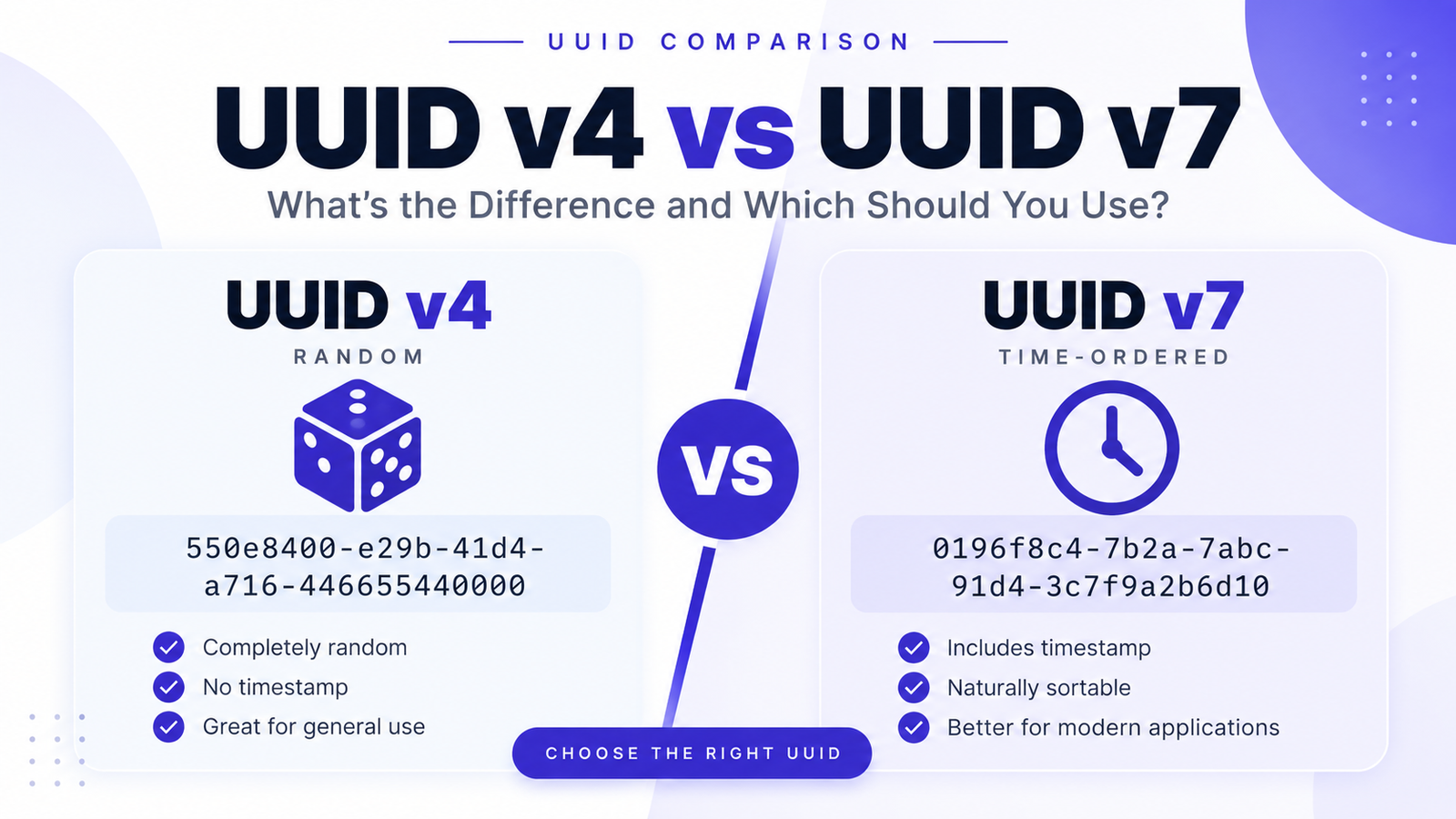
UUID v4 and UUID v7 are two of the most useful UUID formats for modern applications, but they are designed with different priorities. UUID v4 is primarily random, while UUID v7 combines a Unix timestamp with random data to create time-ordered identifiers.
So which one should you use?
For a simple random identifier, UUID v4 is an excellent choice. For new applications where database indexing, sorting, and creation-time ordering matter, UUID v7 is often the better option.
In this guide, we'll explain the differences between UUID v4 and UUID v7, how they work, their advantages and disadvantages, and when to use each one.
Quick Comparison: UUID v4 vs UUID v7
| Feature | UUID v4 | UUID v7 |
|---|---|---|
| Primary design | Random | Time-ordered |
| Timestamp included | No | Yes |
| Randomness | Yes | Yes |
| Timestamp source | None | Unix Epoch milliseconds |
| Size | 128 bits | 128 bits |
| Sortable by creation time | No | Generally yes |
| Database index locality | Poorer for sequential inserts | Better suited |
| Deterministic | No | No |
| Recommended for new time-ordered systems | Not specifically | Yes |
| Best for | General random IDs | Modern databases and distributed systems |
Both are standardized by RFC 9562, the current IETF specification for UUIDs. RFC 9562 defines UUIDs as 128-bit values and specifies UUID versions including v4 and v7.
What Is UUID v4?
UUID v4 is a randomly or pseudorandomly generated UUID.
A UUID v4 might look like:
550e8400-e29b-41d4-a716-446655440000
The 4 in the third group identifies the UUID as version 4.
RFC 9562 specifies that UUID v4 is generated from random or pseudorandom data. It provides 122 bits of random data, with the remaining bits used for the UUID version and variant fields.
Conceptually:
Random Data
     +
Version
     +
Variant
     ↓
UUID v4
For example:
7f8a3b2c-91d4-4e65-a812-3c7f9a2b6d10
UUID v4 does not contain an embedded timestamp.
What Is UUID v7?
UUID v7 is a modern, time-ordered UUID format.
Instead of being almost entirely random, UUID v7 places a 48-bit Unix timestamp in milliseconds at the beginning of the UUID. The remaining space is used for randomness and, optionally, mechanisms that improve monotonicity.
A UUID v7 might look like:
0196f8c4-7b2a-7abc-91d4-3c7f9a2b6d10
The 7 in the third group identifies it as UUID version 7.
Conceptually:
Unix Timestamp
       +
Random / Monotonic Data
       +
Version + Variant
       ↓
UUID v7
The timestamp means UUID v7 values can naturally reflect their approximate creation order.
The Biggest Difference: Random vs Time-Ordered
The simplest way to understand UUID v4 and UUID v7 is:
UUID v4
Random + Random + Random
versus:
UUID v7
Timestamp + Randomness
UUID v4 does not contain creation-time information.
UUID v7 does.
That difference becomes especially important when UUIDs are used as database primary keys or indexes.
UUID v4 Example
Imagine an application creates five UUID v4 values:
c7a4e8b1-...
12f91a62-...
8b3c4d71-...
f92a7c10-...
35e6b821-...
There is no inherent relationship between their lexical order and the order in which they were generated.
If UUIDs are inserted into an indexed database structure, new values can therefore land at different locations in the index.
RFC 9562 specifically notes that non-time-ordered UUIDs such as UUID v4 can have poor database-index locality because successive values are not necessarily close together in the index.
UUID v7 Example
Now imagine generating UUID v7 values:
0196f8c4-1000-7abc-...
0196f8c4-1001-7def-...
0196f8c4-1002-7123-...
0196f8c4-1003-7456-...
The timestamp occupies the most significant portion of the UUID.
As time moves forward, newly generated UUIDs generally sort after older UUIDs.
RFC 9562 specifically designed UUID v7 with time ordering in mind and states that UUID v6 and v7 are designed to sort as opaque raw bytes. Time-ordered UUIDs can provide better database-index locality because newly inserted values are near one another in the index.
Why Does Database Index Locality Matter?
This is one of the most important reasons developers are interested in UUID v7.
Consider a database table containing millions of records.
With randomly distributed identifiers, new records may be inserted into many different locations of an index.
With time-ordered identifiers, new records tend to be clustered closer to recent records.
This can make UUID v7 attractive for workloads involving:
-
Large database tables
-
Frequently inserted records
-
Event streams
-
Logs
-
Transactions
-
Distributed applications
-
Time-based queries
RFC 9562 identifies database keys as an important UUID use case and explains that time-ordered UUIDs can improve index locality.
UUID v4 vs UUID v7: Database Performance
This is where the difference becomes particularly useful.
UUID v4
Record A → random location
Record B → random location
Record C → random location
Record D → random location
UUID v7
Record A → earlier location
Record B → nearby location
Record C → nearby location
Record D → nearby location
This does not mean UUID v7 automatically makes every database faster.
Actual performance depends on the database engine, index structure, schema, workload, storage engine, and implementation.
However, UUID v7's time-ordered structure is specifically intended to improve locality compared with randomly ordered UUIDs.
UUID v4 vs UUID v7: Timestamp
Another major difference is the timestamp.
UUID v4
UUID v4 does not encode a timestamp.
550e8400-e29b-41d4-a716-446655440000
You cannot look at the UUID itself and determine when it was generated.
You need another field, such as:
created_at
if your application needs creation time.
UUID v7
UUID v7 contains a Unix Epoch timestamp in milliseconds in its most significant 48 bits.
Conceptually:
UUID v7

┌───────────────┐
│ Timestamp     │
├───────────────┤
│ Randomness    │
├───────────────┤
│ Version       │
├───────────────┤
│ Variant       │
└───────────────┘
This allows applications and tools that understand UUID v7 to extract or interpret the timestamp.
Does UUID v7 Replace the Created-at Column?
Not necessarily.
Even though UUID v7 contains timestamp information, you should not automatically remove your application's explicit timestamp column.
For example:
id
created_at
updated_at
can still be useful.
An explicit created_at column can provide application-level timestamp semantics, querying flexibility, timezone handling, auditing, and other information that should not be overloaded onto an identifier.
Think of UUID v7's timestamp as useful ordering metadata—not necessarily a replacement for your application's date/time model.
UUID v4 vs UUID v7: Randomness
UUID v4 is primarily random.
RFC 9562 specifies 122 random or pseudorandom bits for UUID v4.
UUID v7 also contains substantial random or pseudorandom space.
Its layout includes:
-
48-bit Unix timestamp
-
Version bits
-
Variant bits
-
Random or optional monotonicity-related data
RFC 9562 describes the remaining UUID v7 space as 74 bits excluding the required version and variant bits, with random data being the default approach and optional mechanisms available for additional monotonicity.
So UUID v7 is not simply a timestamp.
It is a timestamp combined with additional uniqueness data.
UUID v4 vs UUID v7: Security
This is an important distinction.
A UUID should primarily be considered an identifier, not automatically a security credential.
RFC 9562 specifically says that when UUIDs are required for security operations within an application context, UUID v4 should be used.
For security-sensitive values such as:
-
Password reset tokens
-
Authentication tokens
-
Session secrets
-
API secrets
-
Cryptographic keys
use purpose-built cryptographic mechanisms rather than assuming that any UUID is an appropriate secret.
UUID v7 also exposes timestamp information, which may reveal approximate creation time.
Therefore, if exposing timing information is undesirable, UUID v4 may be preferable.
UUID v4 vs UUID v7: Privacy
UUID v4 does not intentionally encode a timestamp.
UUID v7 does.
That means a UUID v7 can reveal information about when it was generated to software that knows how to decode it.
For example, a publicly visible UUID v7 could potentially provide an approximate creation-time signal.
This does not make UUID v7 insecure, but it is something to consider when designing public identifiers.
When Should You Use UUID v4?
UUID v4 is a great choice when you primarily need a random identifier.
Use UUID v4 when:
-
You need a simple unique ID.
-
Creation-time ordering is not important.
-
You do not want timestamp information embedded in the ID.
-
You want a widely recognized UUID format.
-
You need UUIDs for certain security-related application operations.
-
Your database workload does not benefit significantly from sequential ordering.
Example:
user_id =
7c1e4a90-8c52-4d1b-9e2f-1c7a9d8b4e20
For many applications, this is all you need.
When Should You Use UUID v7?
UUID v7 is especially attractive for new applications that need time-ordered identifiers.
Consider UUID v7 when:
-
You frequently insert records into a database.
-
Index locality matters.
-
You want identifiers that naturally sort by creation time.
-
You are building a distributed system.
-
You want timestamp information inside the identifier.
-
You are designing a new system and do not have a legacy UUID v1 requirement.
RFC 9562 explicitly recommends using UUID v7 instead of UUID v1 and UUID v6 when possible.
UUID v4 vs UUID v7 for Databases
For a modern database application, the decision often comes down to this:
Choose UUID v4
Need:
Random identifier
+
No embedded timestamp
+
Simple UUID generation
Choose UUID v7
Need:
Unique identifier
+
Time ordering
+
Better index locality
+
Creation-time information
For a new application where UUIDs are used heavily as database keys, UUID v7 deserves serious consideration.
UUID v4 vs UUID v7 for Distributed Systems
Both UUID v4 and UUID v7 can be generated independently.
This is useful in distributed systems where multiple application servers need to create identifiers without coordinating a central sequence.
For example:
Server A → UUID
Server B → UUID
Server C → UUID
Server D → UUID
With UUID v4, each server generates random identifiers.
With UUID v7, each server generates time-ordered identifiers based on Unix time plus additional uniqueness data.
UUID v7 can therefore provide a useful combination of distributed generation and temporal ordering.
Which Is Faster: UUID v4 or UUID v7?
There is no universal answer.
UUID generation itself is usually not the main performance bottleneck.
The bigger consideration is often how the identifiers interact with storage and indexes.
Random UUID v4 values can produce poorer index locality.
Time-ordered UUID v7 values can improve locality for workloads where records are inserted over time. RFC 9562 explicitly discusses this advantage.
So the practical question is less:
"Which UUID generates faster?"
and more:
"Which identifier structure fits my workload better?"
UUID v4 vs UUID v7: Pros and Cons
UUID v4 Advantages
-
Simple
-
Random
-
Widely supported
-
No embedded timestamp
-
Good general-purpose identifier
-
122 bits of random/pseudorandom data
UUID v4 Disadvantages
-
Not naturally time ordered
-
Poorer database index locality for sequential inserts
-
Does not provide creation-time information
UUID v7 Advantages
-
Time ordered
-
Contains Unix timestamp information
-
Suitable for modern database workloads
-
Better index locality for time-ordered inserts
-
Can be generated independently in distributed systems
-
Designed as a modern alternative for new time-ordered UUID use cases
UUID v7 Disadvantages
-
Reveals timestamp information
-
Requires UUID v7 support in your libraries/tools
-
More complex than simply generating random UUIDs
-
Time ordering should not be confused with a strict global sequence
Is UUID v7 Always Sorted?
Not necessarily as a strict global sequence.
UUID v7 is designed to provide time ordering, but multiple UUIDs can be generated during the same millisecond.
RFC 9562 therefore defines optional mechanisms for additional monotonicity, including counters and sub-millisecond timestamp information.
So think of UUID v7 as:
time ordered, not necessarily:
globally sequential.
Can UUID v7 Replace Auto-Increment IDs?
In many applications, UUID v7 can serve as an alternative to traditional auto-increment identifiers.
For example:
Auto Increment

1001
1002
1003
1004
versus:
UUID v7

0196f8c4-...
0196f8c5-...
0196f8c6-...
0196f8c7-...
UUID v7 provides distributed generation while also providing a time-ordered structure.
However, whether it is a better choice depends on your database, application architecture, storage requirements, and indexing strategy.
Which UUID Should You Use?
Here's the simple recommendation:
| Your Requirement | Recommended |
|---|---|
| Simple random ID | UUID v4 |
| General-purpose UUID | UUID v4 |
| No timestamp in ID | UUID v4 |
| Security-related UUID operation | UUID v4 |
| Time-ordered IDs | UUID v7 |
| Database-heavy application | UUID v7 |
| Better index locality | UUID v7 |
| Sort by approximate creation time | UUID v7 |
| New distributed application | UUID v7 is worth considering |
UUID v4 or UUID v7: Final Recommendation
There is no single UUID version that is best for every application.
Choose UUID v4 if you want a straightforward random identifier.
It is simple, widely understood, and does not expose timestamp information.
Choose UUID v7 if you are building a modern application where time ordering and database index locality matter.
UUID v7 combines a Unix timestamp with random or optional monotonicity-related data, making it particularly useful for modern distributed applications and database-heavy workloads.
For a new system, UUID v7 is often the first format worth evaluating when you want UUIDs that naturally follow creation time.
Generate UUID v4 and UUID v7 Online
Want to try both formats?
Use our free tools:
UUID v4 Generator
Generate random UUID v4 identifiers instantly.
UUID v7 Generator
Generate modern time-ordered UUID v7 identifiers.
You can also use our Bulk UUID Generator to generate multiple UUIDs at once.
Frequently Asked Questions
Is UUID v7 better than UUID v4?
Not universally. UUID v7 is better suited to applications that benefit from time ordering and improved database index locality, while UUID v4 remains an excellent choice for general-purpose random identifiers.
Is UUID v7 faster than UUID v4?
UUID generation speed depends on the implementation. The more important difference is how the resulting identifiers behave in storage and indexes.
Does UUID v7 contain a timestamp?
Yes. UUID v7 contains a 48-bit Unix Epoch timestamp in milliseconds in its most significant bits.
Does UUID v4 contain a timestamp?
No. UUID v4 is generated from random or pseudorandom data and does not encode a timestamp.
Which is better for PostgreSQL or other databases?
It depends on your schema and workload, but UUID v7 is particularly attractive for database keys where time ordering and index locality matter.
Can UUID v7 be sorted?
Yes. UUID v7 is designed as a time-ordered UUID format, and RFC 9562 specifies that UUID v7 values can be sorted as opaque raw bytes.
Does UUID v7 expose the creation time?
It contains a Unix timestamp in milliseconds, so software that parses the UUID can recover the encoded timestamp.
Should I use UUID v4 for passwords?
No. UUIDs should not be treated as passwords. Use a dedicated password hashing and authentication system.
Should I use UUID v7 for API keys?
Not by default. API keys should use an appropriate cryptographically secure design. UUID v7's timestamp component may also be undesirable for secrets.
What does RFC 9562 say about UUID v7?
RFC 9562 defines UUID v7 as a Unix Epoch time-based UUID and recommends UUID v7 instead of UUID v1 or UUID v6 when possible.
Technical reference: IETF RFC 9562 — Universally Unique Identifiers (UUIDs)